If you’re on Twitter you have probably selected a link similar to http://tiny.cc/xphnk which redirects you to the much longer URL https://apicciano.commons.gc.cuny.edu/2010/07/20/e-books-outselling-hardcover-books-at-amazon-com/. You may ask yourself — how is this done? Well look no further!
There are many free web services that will take your lengthy URLs and shorten them for you. This not only allows frees up more characters for your Twitter post, but generally makes it easier to cut and paste URLs into emails, text messages, chats, etc…
Some of these services out there are:
- Tiny URL – create a shorter link
- is.gd URL Shortener – The Shortest URLs Around
- bit.ly | Basic | a simple URL shortener
To use Tiny URL as an example, you would simply paste the URL that you wish to be shortened into the big box then select ‘tiny!’. Once the shortened URL is generated you can use it however you’d like and also monitor stats.

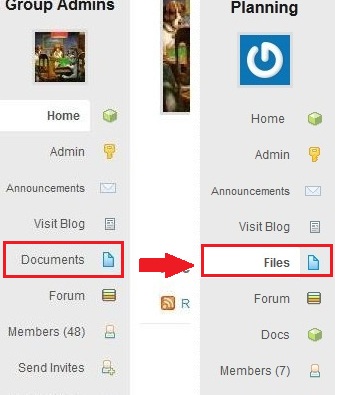 g new feature called “Docs” has been added, allowing you to write and edit collaboratively with members of your group. In order to avoid confusion with Docs, we’ve changed the old “Documents” tab to “Files”. All the files you uploaded to your group in the past can be found on the new “Files” tab on the left side of your group’s page.